RouteSplash Start free trial
Full launch December 5, 2026 · used daily by a working pool company

Everything RouteSplash does, feature by feature

Forty-plus capabilities in one plan with $49 (Starter), $59 base + $30/login + $0.25/pool, then per-pool past 150 — more than any other pool software. A complete reference to the pool service management platform — what each tool does, how it works, and how it fits a working pool route. Written for owners, office staff, and anyone researching pool software.

On this page

Day Sheets & Route Optimization#

Each technician gets a live day sheet — the ordered list of pools they're servicing that day. RouteSplash arranges stops into the shortest driving order and updates it as the day changes.

  • Daily day sheet per technician, ordered by optimized driving sequence
  • Route optimization sorts stops by geographic distance to cut drive time
  • Check-in / check-out timestamps on every stop for time tracking
  • Route adjustments sync to the field instantly when the office reorders a day
Field operations

GPS Check-Ins & Technician Tracking#

Service stops are stamped with the technician's location, so the office knows where the team is and when each pool was actually serviced.

  • Location-stamped check-ins confirm the tech was physically at the pool
  • Foreground GPS pings while the tech is actively working the route
  • Speed alerts flag unusual driving between stops
  • Tech Map with GPS jitter removed: each stop is matched to the nearest customer address, and the tech's check-ins are added on top of the GPS stops
  • No background location service — tracking only while the app is in use
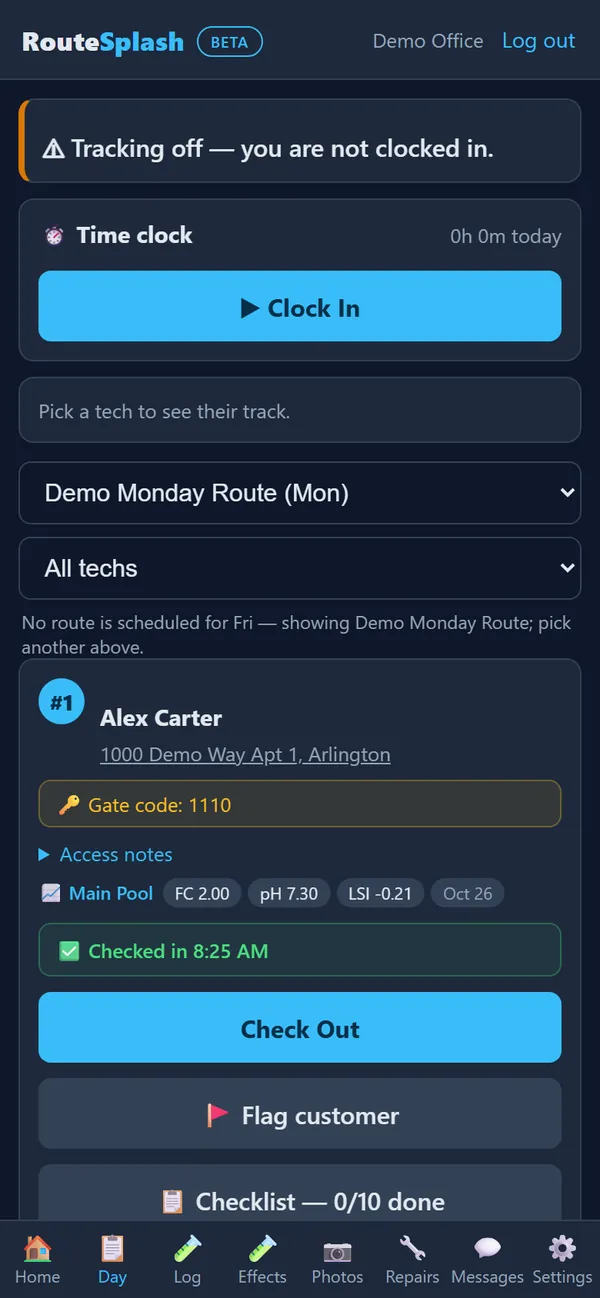
Field operations
RouteSplash day sheet showing a stop with its gate code, latest readings with LSI, and a check-in time
A stop on the day sheet: gate code, latest readings with LSI, and the check-in stamp.

Water Chemistry, LSI & Dosing#

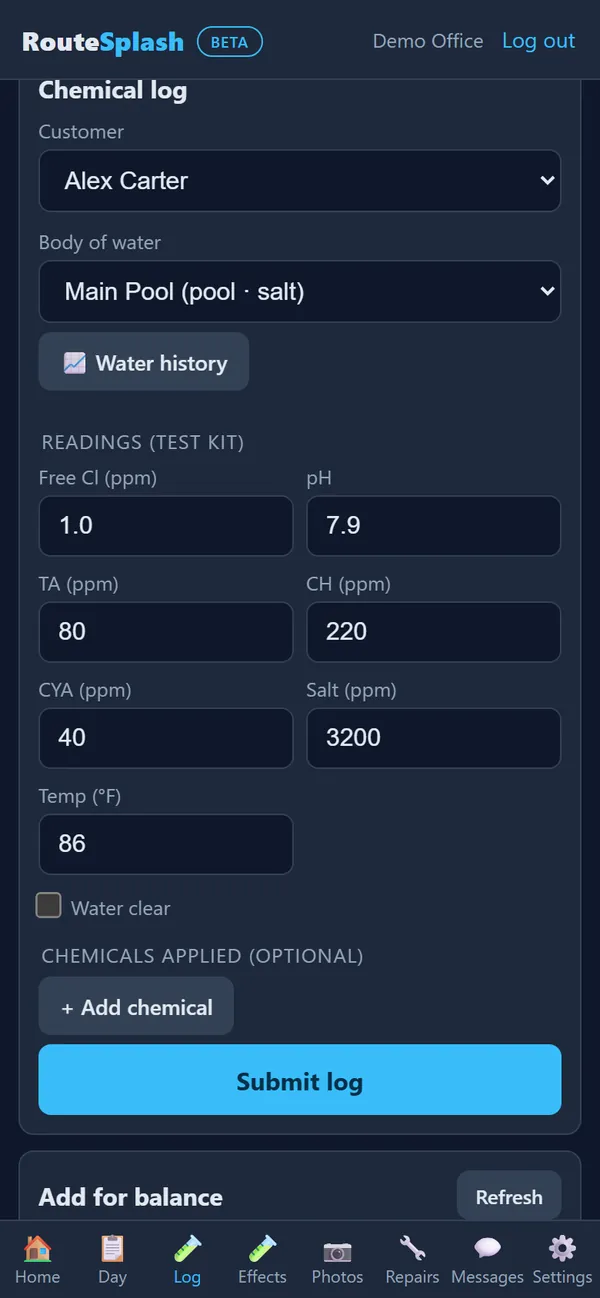
The chemical tracker records every water reading a technician takes and turns it into a clear, actionable recommendation.

  • Log chlorine, pH, alkalinity, calcium hardness, CYA, and more per body of water
  • Scan a dipped test strip with the camera — pad colors are matched to the chart automatically
  • Read a LaMotte Spin Touch meter over Bluetooth in the Android app (experimental; not yet checked on real hardware) and confirm its readings before saving
  • Automatic LSI (Langelier Saturation Index) calculation for water balance
  • Dosing suggestions tell the tech exactly what to add and how much
  • Chemical entries are immutable — corrections add a new entry, never overwrite history
  • Trend data shows how a pool's chemistry changes over time
Water chemistry
RouteSplash chemical log with free chlorine, pH, alkalinity, calcium, CYA, salt and temperature readings entered
Logging a test-kit reading in the field app.

Compliance-Grade Chemical Records#

Every chemical action is recorded in a way that holds up to inspection — for health departments, commercial accounts, or insurance.

  • Complete, timestamped history of readings and chemical additions
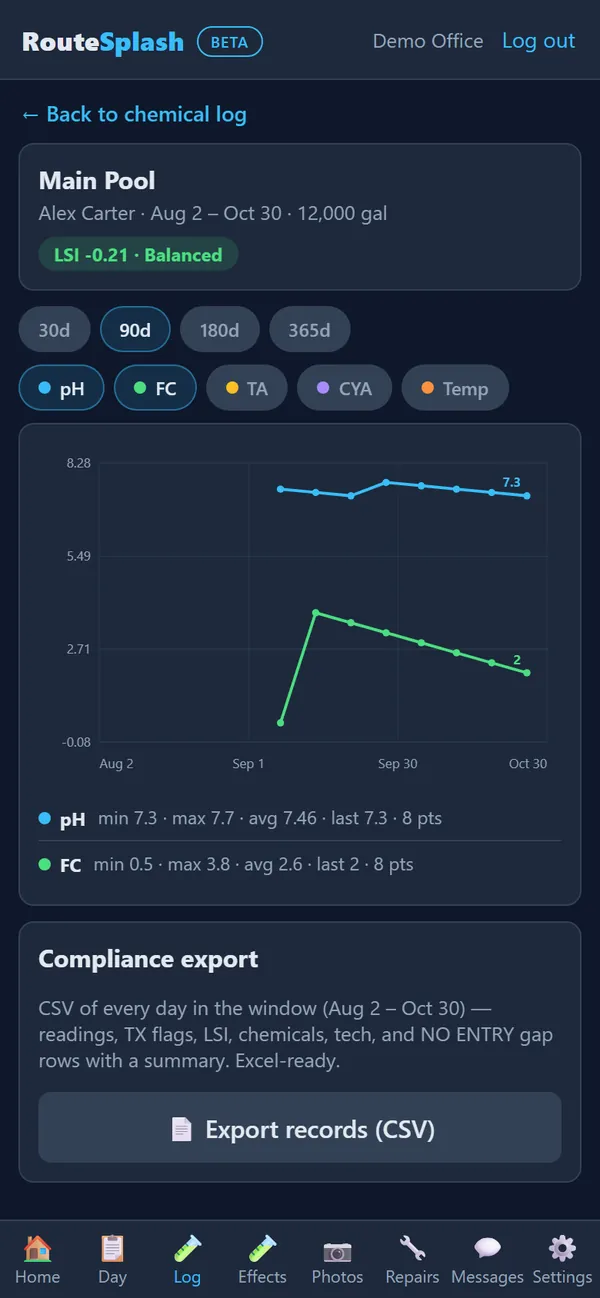
  • Compliance export for regulators and commercial clients
  • Per-customer and per-body-of-water record keeping
Water chemistry
RouteSplash water history with LSI status, a 90-day pH and chlorine chart, and a compliance CSV export button
Water history: LSI status, the trend chart, and the compliance export.

Leak Detection Jobs#

Track leak investigations from suspicion to repair, with findings and repairs documented end to end.

  • Create leak jobs on any pool or body of water
  • Record findings (the leak's location and cause)
  • Log repairs performed and parts used
Service work

Quotes & Estimates#

Build professional quotes from your price book and email them for approval. The customer reads every line, types their name and approves from home.

  • Line-item quotes pulled from your company's price book
  • Emailed approval link: approve with a typed signature, or decline with a reason
  • Optional deposit paid online right after approval, credited on the final invoice
  • The office can email a copy when marking an estimate approved, when customer email and Estimate copy are enabled
  • Convert an accepted quote into an invoice without re-keying
  • You get an email the moment a customer decides
Office & billing

Invoicing & QuickBooks Online Sync#

Generate invoices for service work and keep QuickBooks in sync by itself.

  • Monthly invoices for every customer in one step
  • QuickBooks Online two-way sync every 10 minutes: invoices, customers, payments and voids go out, and payments, voids and customer edits made in QuickBooks come back
  • QuickBooks Desktop file export and import still available
  • Accounts-receivable aging, payment status on every invoice
Office & billing

Online Payments & AutoPay#

Customers pay online or put a card on file, and invoices are charged automatically. The money goes straight into your own Stripe or Square account.

  • Connect your own Stripe or Square account; card/bank details are entered through the selected processor, and RouteSplash stores processor tokens/IDs, not card numbers
  • Pay Online button on every invoice and a shareable pay link
  • AutoPay: sent invoices charged automatically the next morning
  • Declined cards retried 3 days later, then 4 days after that, with an update-card email to the customer
  • Bank (ACH) payments through Stripe
  • Office emailed if all tries fail
Office & billing

Automatic Chemical Billing#

Bill the chemicals your techs log, at your price-book prices, without adding up a month of logs by hand.

  • Every customer, or only the ones you tick
  • Amounts converted for you (oz to lb, qt to gal)
  • Each dose billed exactly once; voiding an invoice releases it
  • Names the tech typed that don't match your price book wait for a one-time match, never guessed
  • Starts from the date you switch it on, never back-bills
Office & billing

Profit by Route & by Pool#

See which pools and routes actually make money each month, money-losers first.

  • Revenue from the month's invoices
  • Chemicals at what you pay your supplier
  • Tech time on site plus drive time between stops
  • Miles from the time-clock odometer or GPS, at your cost per mile
  • Repairs, parts and hours
Money

Truck Weights vs Logged Chemicals#

Weigh chemicals out in the morning and back in the evening, and RouteSplash compares it with what the tech logged on pools.

  • Pounds that left the truck vs pounds logged, per chemical, per tech, per day
  • Liquids converted by weight
  • Days with more than 1 lb and 10% unlogged are flagged
  • Dollar value of the gap at your supplier cost
Money

Customer Texts#

Text customers at the moments that matter, only if they agreed to texts.

  • "You're next" and "your tech has arrived" at check-in
  • "Service done" with a link to the photo report
  • Customers opt in from the homeowner portal, or the office marks consent
  • STOP replies respected automatically; at most one of each text per day
Customer experience

Filter & Salt-Cell Cleans on Autopilot#

Equipment due for service lands on the visit checklist automatically.

  • Filters and salt cells due within 7 days added to the next visit's checklist
  • Ticking it marks the equipment serviced and resets its next due date
  • Lead time adjustable, or switch it off
Operations

Tech Scorecards & Payroll#

See how every tech is doing and what they earned, from what the app already records.

  • Stops, average minutes per pool, readings and reports filed
  • Callbacks: service requests from the same customer within 7 days
  • Hours from the time clock, overtime past 40 at 1.5x
  • Hourly and per-stop pay, CSV download for your payroll provider
Administration

Photo Service Reports & Signature Capture#

Every completed stop produces a service report the customer can see — with photos and a signature to prove the work was done.

  • Attach before/after photos to every service report; repair jobs also accept videos
  • Capture the customer's signature right on the tech's device
  • Notes field for what was done and what needs attention
  • Office view by period: every customer serviced today, this week, last month or any range, with each report marked sent (and the date) or not sent, and a Send button for the unsent ones
Field operations

Customer Portal#

Your customers get a self-service portal to see their service history, reports, and account details.

  • Customers view their own service reports and photos
  • Set up AutoPay and turn on service texts themselves
  • See chemical history and what was added at each visit
  • Access invoices, Pay Online and AutoPay
  • Request service or a reschedule, report a problem, and message the office and tech
  • See repair details and warranties, refer a friend, and read the Pool Passport
Customer experience

Recurring Service Plans#

Set up customers on a weekly, biweekly, or custom schedule and let RouteSplash generate the recurring stops automatically.

  • Define the service frequency and cadence per customer
  • Automatic generation of recurring service stops
  • Pause or reschedule without losing history
Office & billing
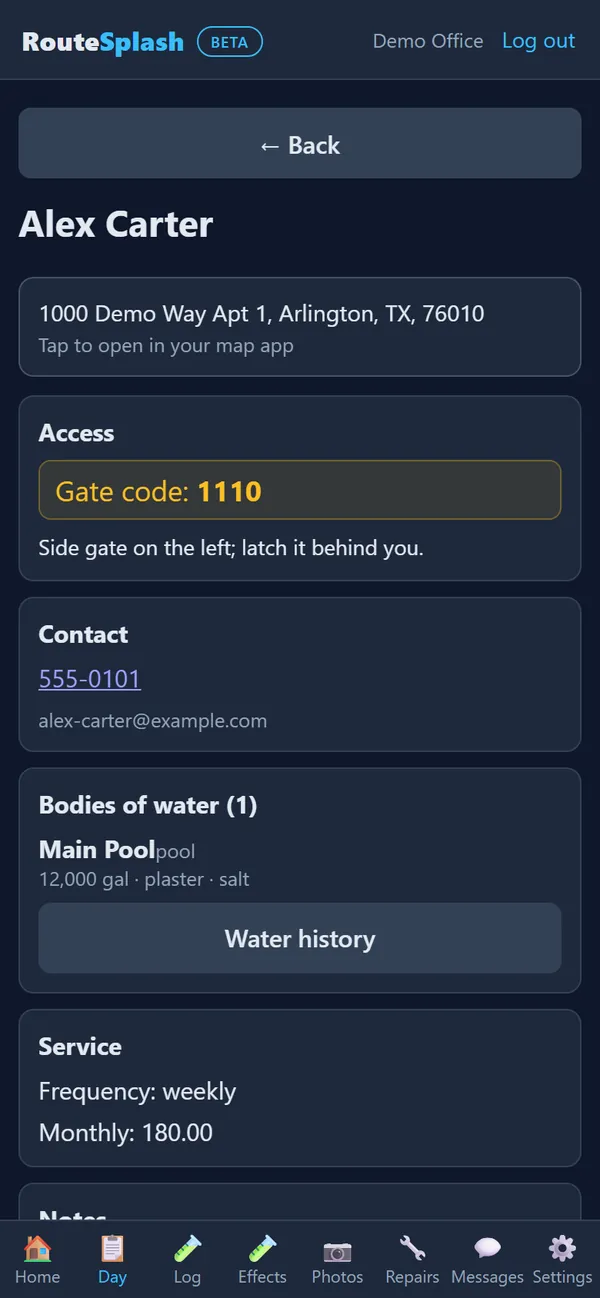
RouteSplash customer record with service address, gate code, pool details and a weekly service plan
A customer record: access notes, pool details and the weekly plan.

Chemical Inventory#

Track the chemicals on your trucks and in your shop so you always know what you have and what you've used.

  • Inventory of chemicals by truck and location
  • Track usage against what was loaded at departure and returned
  • See what's running low before it runs out
Operations

Equipment Tracking#

Keep a record of the equipment at each property — pumps, filters, heaters — so techs know what they're walking into.

  • Log equipment make, model, and install details per property
  • Attach equipment to a customer and body of water
  • Reference equipment history during service and repair
Operations

Repair Jobs#

Track repair work from diagnosis to completion with a clear record of what was fixed and billed.

  • Create repair jobs tied to a customer and equipment
  • Record the issue, the fix, and the parts used
  • Schedule and assign a repair: it goes on the tech's day sheet, placed for the fewest extra miles or where the office chooses
  • Needs parts? Pick a return date and it moves to that day's stops
  • Bill a finished repair in one tap: your labor rate × hours plus parts with your markup, or a flat price
  • Completed repairs stamp a 1-year warranty on the equipment
Service work
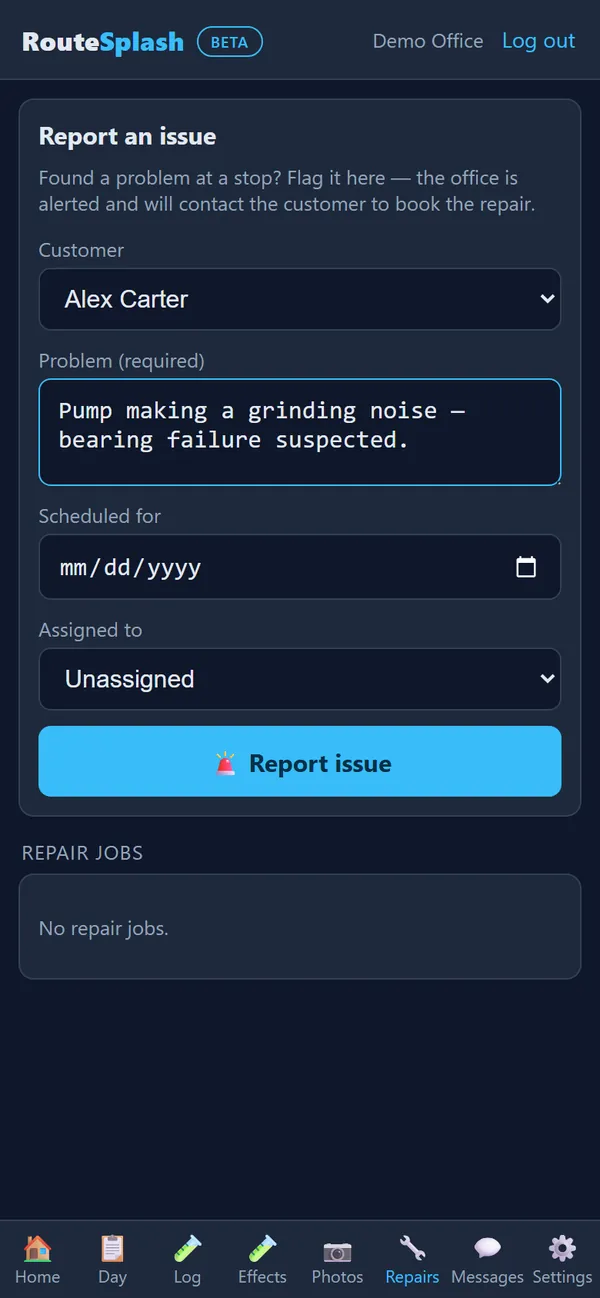
RouteSplash report-an-issue form a technician uses to flag a repair to the office
A tech flags a repair from the stop, and the office is alerted.

Review Requests#

Grow your online reputation by asking satisfied customers for a Google review at the right moment.

  • Send a review request after a completed service stop
  • Automatic cooldown prevents asking the same customer too often
  • Full audit trail of every request sent
Growth

Task Checklists#

Standardize what every tech does at every pool with a required-task library, plus per-customer extras.

  • Tenant-wide required task templates applied to every customer
  • Per-customer custom tasks for property-specific needs
  • Completion tracking so nothing slips through the cracks
Quality control

Offline Mode#

Technicians keep working even without a signal. The app queues changes locally and syncs them when the connection returns.

  • Offline-capable Android app for field work in any coverage
  • iPhone: runs as a web app today — a native iPhone app is coming soon
  • Check-ins, chemical logs, photos, service reports, truck weigh-ins and messages queue on the phone and retry when signal returns
  • Settings → Queued offline items shows what is waiting; Clear removes only waiting device copies, never records already saved on the server
  • Deduplication ensures no double entries after a reconnect
Field operations

Team & Role Management#

Control who sees what. Six roles, from Tech to Admin, each seeing only the screens that role needs, and the Admin can grant or remove a single permission for one person.

  • Tech, Tech Manager, Admin Tech, Manager, Admin Manager and Admin, one ladder of permissions
  • Per-person exceptions: give one tech prices, or take deleting away from one manager
  • Work type per person: cleaning, repair/service, or both; routes and repair jobs follow it
  • Admin password reset for any team member; secure access tokens per user
  • Full details in the Operator Manual
Administration

Job Teams & Pool Builds#

Pull contractors, office staff and techs together on one job thread, and run new pool builds with permits and inspections.

  • Job teams with members, posts, events and deliveries — everyone on the job sees the same thread
  • Pool builds as a phased template, back-to-back, with permits and inspections logged per phase
  • Permit and inspection status flows through the team and emails on approval or failure
  • Contractor directory: companies and contractors find each other by location and trade, with two-way reviews
Service work

Shared Product Catalog#

One shared catalog of parts and products, contributed by the companies that use RouteSplash — stripped of customer data, with no shared pricing.

  • Aggregated from supplier invoices, scrubbed of emails, phones, addresses and customer references
  • Each company sets its own prices; no part numbers are ever shared with a price
  • Sharing is the uploader's choice per upload, with opt-out
Operations

Trucks & Gear#

Track the trucks, tools and gear your company carries — who has it, its condition, and what's running low.

  • Per-truck log with status, entries, photos, and who drove it
  • Equipment by holder: assign, status, check-in and flags
  • Low-stock levels so gear is restocked before it runs out
Operations

Storm Command#

When severe weather is forecast, RouteSplash ranks every active customer by risk so the office can send crews where they're needed first.

  • Detects severe thunderstorm, tornado, flood, hail, high-wind and heavy-rain alerts from the National Weather Service
  • Sorts customers by priority — overflow, debris, or equipment — from their own notes and history
  • One-click storm route from the affected list
Field operations

Property Alerts#

Flag a property so every tech is warned before they walk in — dogs, locked gates, construction, and more.

  • Persistent or temporary alerts (dog, locked gate, construction, lawn crew, party, equipment blocked, irrigation, other)
  • Alerts surface on the day sheet and in the tech's route feed
  • Expiry for one-off warnings so old flags clear themselves
Field operations

Refer a Friend#

Your customers bring in new business, and you track every referral to its reward.

  • Customers refer friends from the homeowner portal, with consent required
  • Office tracks each referral from new to contacted to closed
  • Reward tracking so you know who earned what
Growth

Nearby Work#

Fill slow days and pick up extra stops without the office hunting for work. RouteSplash finds nearby customers and covers sick techs automatically.

  • Neighborhood radar: find active customers near a tech's current position and offer them a stop
  • Sick-tech cover: propose the nearest running route to absorb a tech's day, apply in one tap
  • Smart scheduler suggests the best-fit tech for a booking request
Field operations

Pool Detective#

Every stop comes with a heads-up card that flags what the tech should check before they even arrive.

  • Chem Intel findings and the last out-of-range reading
  • Overdue equipment and open repairs for that property
  • Recent customer requests and callback-risk notes
  • Shown on the day sheet and in the route feed
Field operations

Property History#

Answer “what did we do last time?” in one tap. Every visit is recorded with the evidence to back it up.

  • Per-visit evidence: arrived/left times, GPS confirmation, readings, chemicals, report, checklist
  • Quick answers to common office questions from the record
  • Ready-made office replies built from the visit record
Office & billing

Achievements & Quality Board#

Recognize good work with badges and a weekly quality board — earned on quality, never on speed.

  • Badges: zero-callback champion, clean sweep, safe driver, equipment detective, gear keeper, and more
  • Weekly quality board scores readings and reports filed, with complaints and speed alerts subtracted
  • Plain, explainable scoring — no black box
Administration

Pool Passport#

A single snapshot of a pool's whole story, plus a clean hand-off when a house changes owners.

  • Pools with size, gallons, and how they were measured
  • Equipment with ages and service dates, service history, and latest readings
  • House sold? Transfer to the new owner — history stays with the property, the old owner's access ends
Customer experience

Morning Briefing#

Start every day with a one-line rundown of what the team should know — and what they might have missed.

  • “What did I miss?” — low-stock chemicals and next-route needs
  • Missed revenue finder surfaces money left on the table
  • One line, every morning, no digging
Office & billing

Route Forecast & ETAs#

Know when the route will finish and when each stop will happen, before the day starts.

  • Projected finish time for the whole route
  • Per-stop ETA so the office can set customer expectations
  • Updates as the day unfolds
Operations

Problem Investigator#

Turn “losing water” or “cloudy water” into a diagnosis, not a guess. A rules engine walks through the causes.

  • Leak vs evaporation from weather-based allowance
  • CYA-falling corroboration, low chlorine vs CYA, scaling, overdue filter
  • Pre-arrival checklist and bucket-test rule
  • Findings shown on the request and in the stop's Pool Detective line
Service work

Pool Measuring#

Get accurate pool volume with an aerial photo and a few dimensions — beats guessing for freeform pools.

  • Surface area plus shallow and deep depths
  • Area × average depth × 7.48 for a true gallon count
  • USGS public-domain aerial photo with scale, cached 30 days
Water chemistry

Voice Notes#

Dictate a note instead of typing it. On-device transcription keeps the audio on the phone.

  • Capture a voice note from the log screen in English or Spanish
  • Transcribed on the device — audio never leaves the phone
  • Attached to the visit like any other note
Field operations

Pool Automation Links#

Jump straight into a customer's pool controller from the app — no hunting for the vendor app.

  • Deep links into Pentair IntelliCenter, Hayward OmniLogic, and Jandy iAqualink
  • Web-portal fallback when the app isn't installed
  • Opening the controller from a stop stores nothing. Optional 24/7 equipment monitoring keeps the pool-equipment account login encrypted, only after the homeowner opts in
Field operations

Geofence Auto Check-In/Out#

Check in and out automatically when the tech arrives and leaves, so the day sheet records itself.

  • Arrival radius and exit hysteresis tuned for real driveways
  • Silent background check-in/out — never queued, never delayed
  • Distance readout on each stop so the tech knows how close they are
Field operations

Equipment Reminders & Freeze Alerts#

Flag equipment that's aging out and warn the team before a freeze hits.

  • Equipment age alerts as gear approaches replacement
  • Freeze alerts when temperatures drop toward dangerous levels
  • Surfaced on the day sheet so nothing catches the team off guard
Operations

Leads#

Every person who asks about service, in one list, until they become a customer or a clear "no".

  • Name, contact, address, the service they want and how they found you
  • Moves forward only: new, contacted, quoted, then won or lost (lost needs a reason)
  • Convert a won lead into a customer in one step, ready for a route
  • In the manager portal and in the phone app for office roles
Office & sales

24/7 Equipment Monitoring#

For customers with Hayward OmniLogic, Pentair or Jandy iAquaLink equipment, RouteSplash reads the equipment about once an hour and warns you before a small problem becomes an emergency.

  • Fixed rules, not guesses: freeze risk, equipment offline, heater left on, pump running 24 hours or more, pump at 100 RPM or less, and too little pump time in hot weather
  • Optional and off for every customer until the office turns it on, from the portal or the phone app; the homeowner agrees because it uses their own equipment login
  • The login is stored encrypted and never shown again; Revoke stops monitoring and erases it
  • The office sees every alert, techs see alerts for the customers on their own routes, homeowners see their own equipment status in their portal
Equipment

Equipment & Pump Control#

Change a monitored customer's equipment settings without driving out, and run the pump from the stop.

  • Every change asks to confirm and is written to a log; if the brand refuses, you get a plain message and nothing changes
  • One Equipment button for every brand: RouteSplash picks the brand and connection itself, then shows plain settings (pump on/off/speed, heater on/off/temperature, salt output) for only what that brand supports
  • Techs use the same screen at the stop for customers on their own routes; Pentair supports at-pump Bluetooth; Jandy supports pump WiFi and Bluetooth pairing, with commands through pump WiFi (Android app, experimental). Hayward uses the cloud connection; local Hayward control is not built
Equipment

Site Survey & Export#

Walk a yard with the phone camera and get a plan: distances, area, slope and the things you must not dig into.

  • Corner points plus markers for utilities, sprinklers, valves, drains, electrical, gas, water meters, trees, fences and structures
  • Area of the outline, distance and slope between points, and the height of every point
  • Top-down plan with an aerial photo underneath and a map link
  • Export: a CSV spreadsheet of every point, and a printable plan you can save as a PDF; links work for 30 days without a login, so you can send one to a builder
  • Capturing needs an Android phone with AR support; saved surveys open anywhere
Field operations

Scan a Product Label#

Point the phone at a barcode to put equipment on a customer's record without typing.

  • Looks the code up in your own price book by supplier part number first, then in a free public product database
  • You confirm the type, model and serial number before it saves
  • Nothing is guessed: an unknown code means you type the details yourself
Equipment

Filter Pressure Alerts#

Catch a dirty filter from the gauge reading, not from a customer complaint.

  • Record each filter's normal PSI and the PSI at which it needs cleaning
  • An alert opens on that filter when a reading reaches the limit, and clears when the pressure comes back down
Equipment

Reality Capture for Pool Builds#

Keep the real measurements of a build site on its job team, so you can compare before and after.

  • A grade survey of the yard before digging
  • Record a point cloud or mesh from a scanner such as a Revopoint by name, date and file details; binary 3D upload, reconstruction and a 3D comparison viewer are not built yet
  • Photo survey (experimental); each capture is named and dated
Projects

Contractor Directory & Sign-Up#

Independent contractors can join for free and find work from the pool companies that use RouteSplash.

  • Free contractor sign-up through an emailed link — no card, no trial
  • Contractors list their trades and service area so companies can find them
  • Search by trade and distance; reviews both ways, only after a recorded job
  • Cross-company hub so a contractor's work history follows them
Growth

Built by a working pool company

RouteSplash runs real routes every day — same techs, same customers, same money on the line. Try it free for 30 days, no credit card.

Start free trial